
This blog is in continuation of the previous blog on deletion of trailing zeroes. In case you have missed reading it, you can find it here. You may miss out on interesting approach if you don’t read previous one as well.
The problem we are trying to solve here is how to remove unnecessary trailing zeroes so that the data presentation looks cleaner and extra space can be used to display additional relevant content.
The Second approach
Let’s consider 156.1050000. This has 4 trailing zeroes after last relevant digit. We can remove the trailing zeroes by simply deleting trailing zeroes by using latest syntax of shifting the trailing zeroes to the right and then condensing the output.
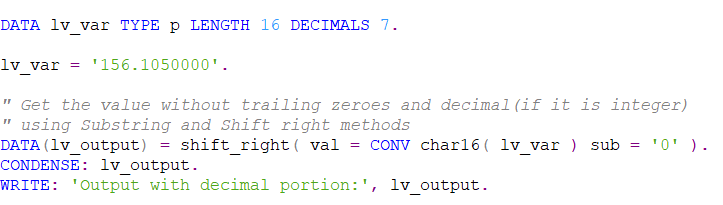
The output of above exercise will come as shown below:

Let’s consider 156.0000000. This has 7 trailing zeroes after the decimal and effectively it can be written as integer 156. We will follow the same process as above with few additional steps. The additional steps would be to get the last character of the string using substring method and check whether it is equal to decimal(.). If the last character is decimal, we will remove the decimal using substring method with length 1 less than actual length.
Please refer below example:

The output will be shown as below:

 Elide Blogs
Leave a comment