
Before we start our discussion on string manipulations, let us first understand what a string is.
Strings
A string is group of characters (letters or numbers) written together to form a word. In SAP ABAP, we perform lot of operations on strings to suit our needs.
In this blog, we will discuss about how to get just numerical part of a number without trailing zeroes.
What is a trailing zero?
A trailing zero gets added towards the end of the number.
For example- 1.5 with 2 trailing zeroes will become 1.500
The problem we are trying to solve here is how to remove unnecessary trailing zeroes so that the data presentation looks cleaner and extra space can be used to display additional relevant content.
Though there are various methods to do it, we will discuss 2 different approaches to achieve the same requirement.
Let’s consider 156.1050000. This has 4 trailing zeroes after last relevant digit. We can remove the trailing zeroes by checking whether there exists any fractional part in the number by using FRAC function. Once it is determined that fractional value is present, we can simply delete trailing zeroes by using latest syntax of shifting the trailing zeroes to the right and then condensing the output.

The output of above exercise will come as shown below:

Let’s consider 156.0000000. This has 7 trailing zeroes after the decimal and effectively it can be written as integer 156. We will follow the same process as above with an additional step. The additional step would be to get the integer portion of the number using TRUNC function. If we choose to use the shift right function, we will end up getting additional decimal at the end like “156.” So, it becomes necessary to use different approach where decimal part just contains 0s.
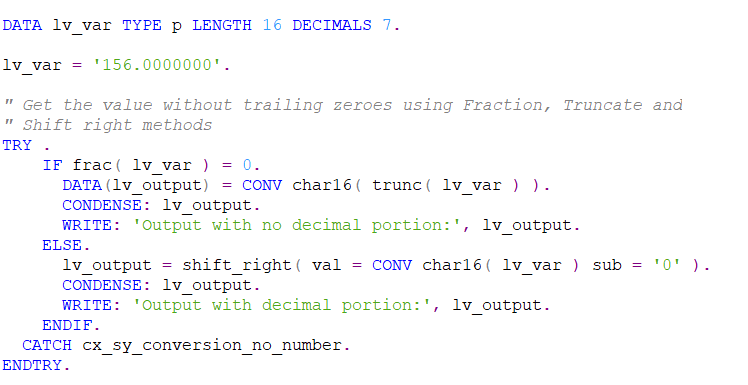
The output will be shown as below:

You can find another approach to achieve the same requirement here.


 Elide Blogs
Leave a comment